Understanding WhatsApp's New User IDs
What You Need to Know about the BSUID

Meta is making some big updates to how privacy and identity work on WhatsApp, specifically with the introduction of WhatsApp Usernames. You might have already seen users choosing handles like @TinaTextIt to keep their phone numbers private. 💬
To make this possible behind the scenes, Meta is introducing a new identifier called the Business-Scoped User ID (BSUID). While this sounds technical, we’ve designed TextIt to handle the heavy lifting for you. Here is a clear breakdown of what’s changing and why it’s good for your business.
What is a BSUID?
Think of a BSUID as a unique digital "serial number" for a contact that is specific to your business.
✅ Stability: Unlike phone numbers, which can occasionally change, these IDs are stable identifiers.
✅ Privacy: They allow users to message you without revealing their personal phone digits.
✅ Unique to You: A BSUID is tied to your specific account. An ID used for a contact in your workspace won't work for any other business.
How to spot them: They are easy to recognize! They start with a two-letter country code followed by a long string of letters and numbers (for example: US.1a2b3c4d5e...).
How TextIt Handles the Switch
We know your workflows and automated flows are the heart of your communication, so we are managing this transition to be as seamless as possible.
● Automatic Updates When a contact uses a username, Meta provides us with their BSUID. TextIt automatically adds this to the contact’s profile as a new "URN" (Uniform Resource Name). You don’t have to click a single button.
● The Migration
As Meta moves toward making BSUIDs the primary way to message, we will update your contact URNs automatically:
* The BSUID will eventually become the primary whatsapp: URN.
* The original phone number will move over to a tel: URN.
● Your Flows Stay Intact
The best part? Your current expressions (like whatsapp != ""), groups, and campaigns will continue to work exactly as they do today. We’ve ensured that the logic you’ve built doesn't skip a beat.
A Note for API Users
If you use our API to sync data with other platforms, we have a big tip: Use the contact UUID.⭐
Because identifiers are shifting from phone numbers to BSUIDs, the UUID is the most reliable, "forever" ID for any contact. If your current integration relies on phone numbers to find people, now is a great time to switch your logic to use the UUID instead.
The Big Picture
👉 Existing customers? No change.
👉Outbound messaging to known phone numbers? Works perfectly.
👉 New conversations via usernames? Handled automatically.
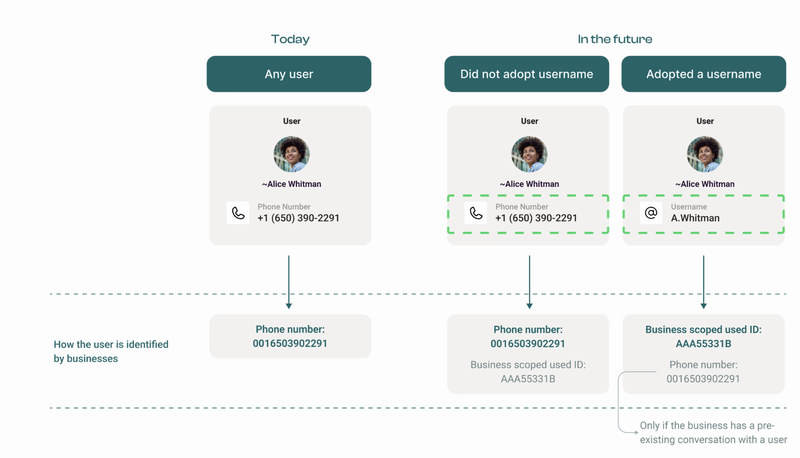 Illustration of BSUID changes (Taken from 360dialog's documentation on WhatsApp BSUID updates)
We’re excited about these changes because they offer your users more privacy while giving you more stable data. If you want to dive deep into the technical specs, you can check out the official documentation from Meta or 360dialog.
Questions? We’re always here to help!
More from the blog

Changes Coming to Tickets
We have some exciting new features on the way, but we need to make a couple of small changes to tickets in preparation.

A New Look For Campaigns
Smarter Reminders, Fewer No Shows

Meeting People Where They Are
How Early Alert Uses TextIt to Reach Students & Veterans Before a Crisis