Split by AI
Smarter Routing for Conversations
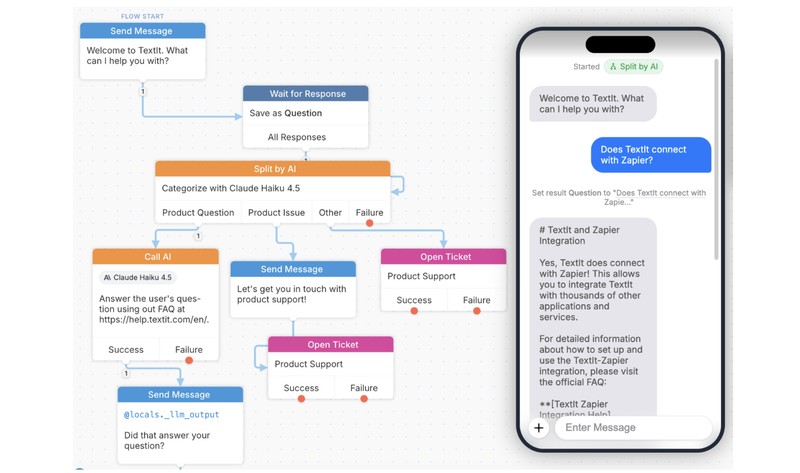
Modern messaging workflows are rarely simple. People don’t always answer with perfect keywords, and conversations often include slang, typos, or indirect responses. That’s where Split by AI comes in.
The Split by AI action lets you automatically categorize incoming messages using a large language model (LLM) and route contacts down the right path in your flow.
Instead of relying on rigid keyword rules like “if message contains ‘refund’ → go here”, you define simple natural-language categories, and the AI handles the interpretation. It understands intent, even when the wording varies.
Think of it as giving your chatbot the ability to read between the lines.
Why Split by AI is Powerful
Traditional keyword-based routing breaks easily:
- “I want my money back” vs “refund pls” vs “can I get reimbursed?”
- Misspellings like “tehcnical issue”
- Indirect responses like “it just stopped working after the update”
Split by AI handles all of these variations by focusing on meaning, not exact words.

Common Use Cases
1. Customer Support Triage
Automatically route incoming messages to the right team:
- Billing → “I was charged twice”
- Technical Support → “App keeps crashing”
- Sales → “How much does this cost?”
You can even go further:
- Escalation → “I need to speak to a manager”
- Cancellation → “I want to close my account”
2. Sentiment-Based Routing
Not all feedback should be treated the same way.
- Positive → “Love the new update!”
- Neutral → “It works fine”
- Negative → “Very disappointed with this service”
You can use this to: - Trigger apology messages - Route angry users to human agents - Flag feedback for product teams
3. Survey & Feedback Classification
Open-ended survey answers become structured data automatically:
- Pricing → “Too expensive”
- Features → “Missing offline mode”
- Usability → “Hard to navigate”
- Performance → “Very slow on my phone”
Instead of manually reading hundreds of responses, you get clean categories instantly.
4. Lead Qualification
Use AI to understand intent in inbound leads:
- High Intent → “I want a demo this week”
- Researching → “Just comparing options”
- Not Ready → “Maybe next year”
- Spam → “Buy followers / crypto offers”
This helps sales teams prioritize real opportunities.
5. Order & Service Requests
For commerce or service flows:
- Order Status → “Where is my package?”
- Returns → “I want to return this item”
- Product Question → “Does this come in red?”
- Complaint → “Item arrived damaged”
How to Configure Split by AI
Setting it up is straightforward:
1. Choose the Split by AI action
Select the LLM you want to power the decision-making.
2. Define the input
Usually this is the contact’s latest message, such as @input.text.
3. Set your categories
Write the exact labels you want the AI to choose from (for example: Billing, Support, Sales).
4. Save the result (optional)
Store the selected category in a variable like ticket_type for later use in your flow.
Split by AI vs Call AI
It helps to think of these two tools as doing very different jobs:
Split by AI = Routing
- Picks ONE category from a fixed list
- Automatically creates branches in your flow
- Best for deciding where the conversation goes next
Call AI = Generation
- Produces text freely from a prompt
- No fixed categories or branches
- Best for writing, summarizing, or answering questions
A simple rule of thumb:
- Use Split by AI when you need a decision
- Use Call AI when you need content
Split by AI brings structure to messy, real-world conversations. Instead of trying to predict every possible phrase a user might type, you define intent categories and let AI do the interpretation work.
The result is simpler flows, smarter routing, and a better experience for your users—especially at scale.
If you haven't already, sign-up for your FREE 90 day trial and start exploring how TextIt & AI can help automate your workflow!
More from the blog

Changes Coming to Tickets
We have some exciting new features on the way, but we need to make a couple of small changes to tickets in preparation.

A New Look For Campaigns
Smarter Reminders, Fewer No Shows

Meeting People Where They Are
How Early Alert Uses TextIt to Reach Students & Veterans Before a Crisis